
In the world of high-end PC builds and console sanctuaries, lighting is no longer an afterthought—it is the soul of the room. As we move through 2026, the “RGB everything” trend has matured into a more curated, artistic approach. At the heart of this evolution is the gaming neon sign.
Related products: Respawn – Gaming Comeback Sign, Hey Guys – YouTuber Intro Phrase, Coming Soon – Podcast Teaser Sign.
Related products: Level Up Your Space – Custom Neon Signs, Game Over – Retro Arcade Corner.
Related products: Subscribe Neon Sign – For YouTubers, Streamers & Creators, Grind & Shine Neon Sign – For TikTok & Reels Creators, Subscribe – YouTube Icon Backdrop.
A gaming room neon sign is the definitive “anchor piece” that transforms a generic office into a professional-grade streaming or gaming environment. While traditional lighting provides visibility, LED Neon Flex provides atmosphere without the heat, noise, or fragility of old-school glass neon. For the modern gamer, choosing a high-quality LED sign is a strategic investment in visual branding, eye comfort (by reducing screen glare), and energy efficiency, allowing for a 24/7 “pro-streamer” glow at a fraction of the operational cost.
Whether it’s a glowing gamertag, an iconic character silhouette, or a pixel-art mascot, neon defines the atmosphere of the digital realm. While the glow is the goal, the technology behind it determines the experience: LED Neon Flex is silent (no transformer hum), cool-to-the-touch (it won’t overheat a small room), and highly customizable. Investing in quality LED neon doesn’t just improve your room’s “vibes”—it enhances content-creation quality for streamers and provides a flicker-free environment that reduces eye strain during marathon sessions.
Why a Neon Sign Is the “Final Boss” of Gaming Room Decor
If you’ve spent thousands on a GPU and a 4K monitor, hanging a paper poster next to it feels like an imbalanced build. The “gaming room” (or man cave / girl cave) has evolved, and in 2026 the trend has shifted from “cluttered collector” to “curated immersion.”
- The “Immersive” Factor: Unlike standard LED strips that hide under desks, neon signs are focal points. They provide a soft, diffused ambient light that fills the room without causing the harsh reflections on your monitor that overhead lights do.
- Streamer Identity: With platforms like Twitch and YouTube more competitive than ever, a neon sign acts as a visual hook. For those on stream, a custom neon sign in the “background bokeh” is a non-verbal signature—it tells your audience exactly who you are before you even speak, and it makes your background instantly recognizable.
- Mood Architecture: Gaming is an emotional experience. Dimming the overhead lights and relying on a deep purple or “cyberpunk” red neon glow shifts the brain into “play mode,” increasing focus and immersion.
LED Neon vs. Traditional Glass: The Gamer’s Choice
In the context of a small, often enclosed gaming room filled with heat-generating electronics, the technical specs of your lighting matter more than you think. Here is how the two technologies compare for a home setup.
| Feature | Traditional Glass Neon | LED Neon Flex (2026 Standard) |
| Heat Output | High (can raise room temp by 2–3°C) | Negligible (stays cool to touch, safe for tight spaces) |
| Noise (Buzz) | Audible 60 Hz hum (picks up on your mic) | 100% silent (perfect for recording) |
| Durability | Fragile (don’t rage-quit near it!) | Shatterproof silicone |
| Content Creation | Can cause “banding” on camera | Flicker-free (high-frequency LEDs) |
| Power Draw | 150 – 300 Watts | 20 – 60 Watts |
Key Data: For a gamer who plays 6 hours a day, an LED neon sign will cost approximately $12–$15 per year in electricity, whereas a traditional glass sign can exceed $70 per year. More importantly, the silence of LED neon is vital for streamers using sensitive condenser microphones—the hum from a glass-neon transformer is easily picked up during quiet gameplay moments and can ruin otherwise clean audio.
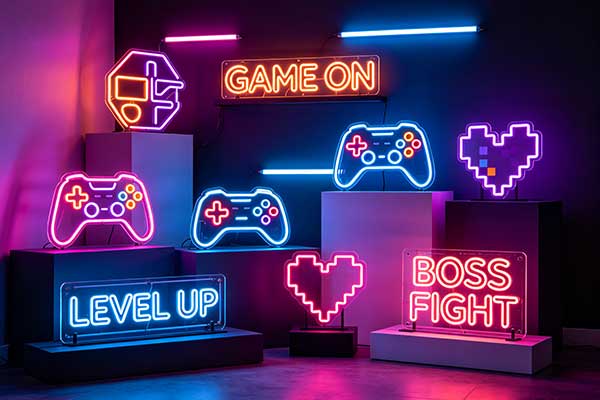
Popular Gaming Neon Sign Design Trends for 2026
So what are gamers actually putting on their walls this year? The market is now split between “instant grabs” and “custom masterpieces,” and a few clear design directions have emerged.
The “Retro-Futurism” Look
8-bit icons (Pac-Man ghosts, Mario mushrooms) rendered in ultra-modern neon lines—nostalgia executed with a clean, contemporary glow.
Japanese Katakana
“Game Over” or “Victory” written in Japanese characters is a massive trend in the “zen-gamer” aesthetic, combining arcade heritage with a minimalist, architectural feel.
Floating Acrylics
Signs mounted on clear, “ghosted” backings that make the light appear to float two inches off the wall, adding real depth to a stream background.
Custom vs. Stock: Finding Your Signature
- Popular Icons: Classic controllers, “Game Over” text, or pixel-art ghosts are great for filling space and work as an easy starting point.
- Custom Gamertags: The ultimate flex is a neon sign of your own handle. High-quality vendors let you upload your personal logo or font, which is then laser-cut into an acrylic backing and hand-fitted with LED flex.
- Dynamic RGB: Signs that sync with your PC’s internal lighting (via Razer Chroma or Corsair iCUE integration) allow the wall art to change color based on in-game health or environment—see our breakdown of RGB vs. single-color neon signs if you’re deciding between the two.
If you want to turn a handle, a quote, or a logo into a one-off piece, our guide to designing your own custom neon sign walks through fonts, colors, and sizing before you order.
Eye Comfort, Ambiance and Color Psychology
Gamers spend hours staring at screens; the last thing you need is a light source that causes a headache. Gaming in a pitch-black room causes significant eye fatigue due to the high contrast between the bright screen and dark walls.
- Bias Lighting: A neon sign acts as a form of “bias lighting.” By providing a constant source of ambient color in your peripheral vision, it helps your pupils stay at a more consistent size, reducing the “monitor headache” after long sessions.
- Color Psychology:
- Cyberpunk Blue/Pink: Boosts alertness and matches the “synthwave” aesthetic.
- Deep Red: Increases heart rate and intensity—perfect for competitive FPS players.
- Green/Teal: A classic “Matrix” or Nvidia-style vibe that feels tech-focused and cool.
- Dimming Is Mandatory: A neon sign at 100% brightness is often too intense for a dark room, and it will “blow out” your webcam into a white blur on stream. Most 2026 gaming signs ship with a remote that lets you drop the brightness to 10–20%—perfect for late-night sessions.
- Color Temperature: Blue light is great for energy but bad for sleep. Many gamers are now opting for “amber” or “sunset orange” neon to keep a warm environment that doesn’t totally disrupt their circadian rhythm.
Installation and Cable Management for the Perfect Battle Station
Nothing ruins a high-tech gaming setup like a messy black wire dangling from a beautiful glowing sign, and a poorly hung sign can ruin the aesthetic on its own. Follow these 2026 pro-tips.
- Hide the Wires: Use “D-Line” cable trunking painted the same color as your wall to hide the power cord, or run the thin silver wire behind wall panels and cable raceways. The “invisible” run is what separates a professional setup from a cluttered one.
- The Standoff Look: Use standoff mounts (the small silver cylinders) rather than hanging the sign like a picture frame. This holds the sign one inch off the wall, allowing the light to “glow” behind it and create a beautiful halo effect.
- Brightness Control: Always ensure your sign comes with a dimmer. Setting it to 20–30% makes the colors pop perfectly on camera instead of washing out.
- USB vs. Wall Plug: Smaller signs (under 15 inches) can often be powered via USB directly from your PC or monitor. Larger focal pieces require a dedicated DC power brick to ensure constant, flicker-free brightness.
Smart Home and PC Sync: The Connected Gaming Room
Modern gaming setups increasingly integrate neon lighting with smart-home ecosystems for automated, immersive experiences. Look for signs that are Matter or Zigbee compatible, or that can be linked to a 12V-to-Zigbee controller or smart plug. That lets you sync your neon sign with your PC’s RGB software (like Razer Chroma or Corsair iCUE), so your wall light changes color based on your in-game health or the time of day.
Smart LED neon signs compatible with Alexa, Google Home, or Razer Chroma can react to music or game audio, or sync with other smart lights in the room. Picture your neon sign flashing red when your health is low in a battle royale, or cycling through team colors during an esports tournament. Voice-controlled neon lets you switch ambiance without leaving your controller. Many enthusiasts build “scenes” that combine neon signs, bias lighting behind monitors, LED strips along desks, and smart ceiling lights—all triggered by a single command like “Alexa, gaming mode.” As smart-home technology advances, the line between decorative neon and functional gaming equipment continues to blur. If your goal is a stream-ready backdrop, our guide to choosing a neon sign for Twitch and YouTube setups covers camera-friendly placement and color.
Technical Specs, Safety and Sustainability
Most gaming neon signs in 2026 use UL-certified 12V power adapters. They are rated for 50,000+ hours, meaning that if you leave one on for 8 hours every single day, the sign will last for over 17 years. They are also mercury-free and RoHS compliant, which makes them safe for small, unventilated rooms where a glass-neon transformer would be a genuine concern. Because they run on low-voltage DC and stay cool, they pose no fire risk to your walls or nearby gaming equipment, even during extended subathons.
ROI: The Content Creator’s Investment
For those pursuing gaming as a career, a custom neon sign is more than decor—it is a branding expense, and in many jurisdictions a tax-deductible one.
- Brand Retention: A glowing name or logo physically present in the background is far more memorable to viewers than a digital overlay that disappears the moment the stream ends. It becomes the visual shorthand for your channel.
- Production Value: A $200 neon sign can make a $500 setup look like a $5,000 professional studio, because it gives the camera a deliberate, styled focal point instead of an empty wall.
- Always-On Aesthetic: Unlike a poster or a printed banner, a neon sign is part of the room’s lighting, so it works in every shot and every lighting condition.
Frequently Asked Questions
Q1: Will a neon sign interfere with my Wi-Fi or wireless headset?
No. Unlike old-fashioned neon that uses high-voltage transformers capable of creating electromagnetic interference (EMI), LED neon signs use low-voltage DC power. They do not emit radio-frequency interference, so your ping and audio will remain crystal clear.
Q2: Will a neon sign reflect off my monitor and cause glare?
Glare is a common concern. To avoid it, mount your neon sign on the wall behind your monitor or to the side at a 45-degree angle—never directly opposite the screen. A matte-finish screen protector or a monitor with an anti-glare coating also helps significantly.
Q3: Can I sync my neon sign with my PC games?
Yes, if you buy a sign specifically labeled “Smart RGB” or “Addressable LED.” These come with controllers that can be plugged into your motherboard’s ARGB header or linked via a smart bridge to software like Govee or Philips Hue, matching the sign’s color to the action on screen.
Q4: Can I sync my neon sign with my Philips Hue or Nanoleaf setup?
Yes, but you usually need a smart plug or a 12V-to-Zigbee controller. By plugging your neon sign into a smart outlet, you can include it in your “Gaming Mode” voice command (e.g., “Alexa, Game On”), causing your PC, Nanoleaves, and neon sign to all ignite at once.
Q5: Is it safe to leave my neon sign on during an 8-hour stream?
Absolutely. High-quality LED neon signs are rated for 50,000+ hours of continuous use. Because they use low-voltage (12V) power and stay cool, they pose no fire risk to your walls or nearby equipment, even during extended subathons.
Q6: How do I clean my neon sign without scratching it?
Gaming rooms can get dusty. Switch the sign off first. Use a compressed-air duster to blow away loose particles, then wipe the acrylic and silicone gently with a clean microfiber cloth. Avoid using Windex or ammonia-based cleaners on the acrylic, as they can cause “crazing” or cloudiness over time.
Ready to build the room? Browse our game room neon sign collection for console, PC, and arcade-themed pieces, or explore the streaming and gaming backdrop signs designed for on-camera use. If you are still planning the rest of the desk, see our content creator desk setup ideas.
Looking for a specific piece? The microphone and headphones neon sign is a popular choice for recording and streaming corners.